









Per-User Pricing Was Built on Labor. AI Just Changed the Labor.
Most MSPs already know their pricing is under strain. An Omnia poll of 255 MSPs found that only 40% are sticking with traditional per-user pricing, while 60% are reevaluating it or moving toward hybrid, outcome-based, or consumption models. Close to 43% are actively looking at alternatives to per-user pricing, and another 17% admit they need to change but have no clear direction.
Most MSPs already know their pricing is under strain. An Omnia poll of 255 MSPs found that only 40% are sticking with traditional per-user pricing, while 60% are reevaluating it or moving toward hybrid, outcome-based, or consumption models. Close to 43% are actively looking at alternatives to per-user pricing, and another 17% admit they need to change but have no clear direction.
Read full post on getthread.com


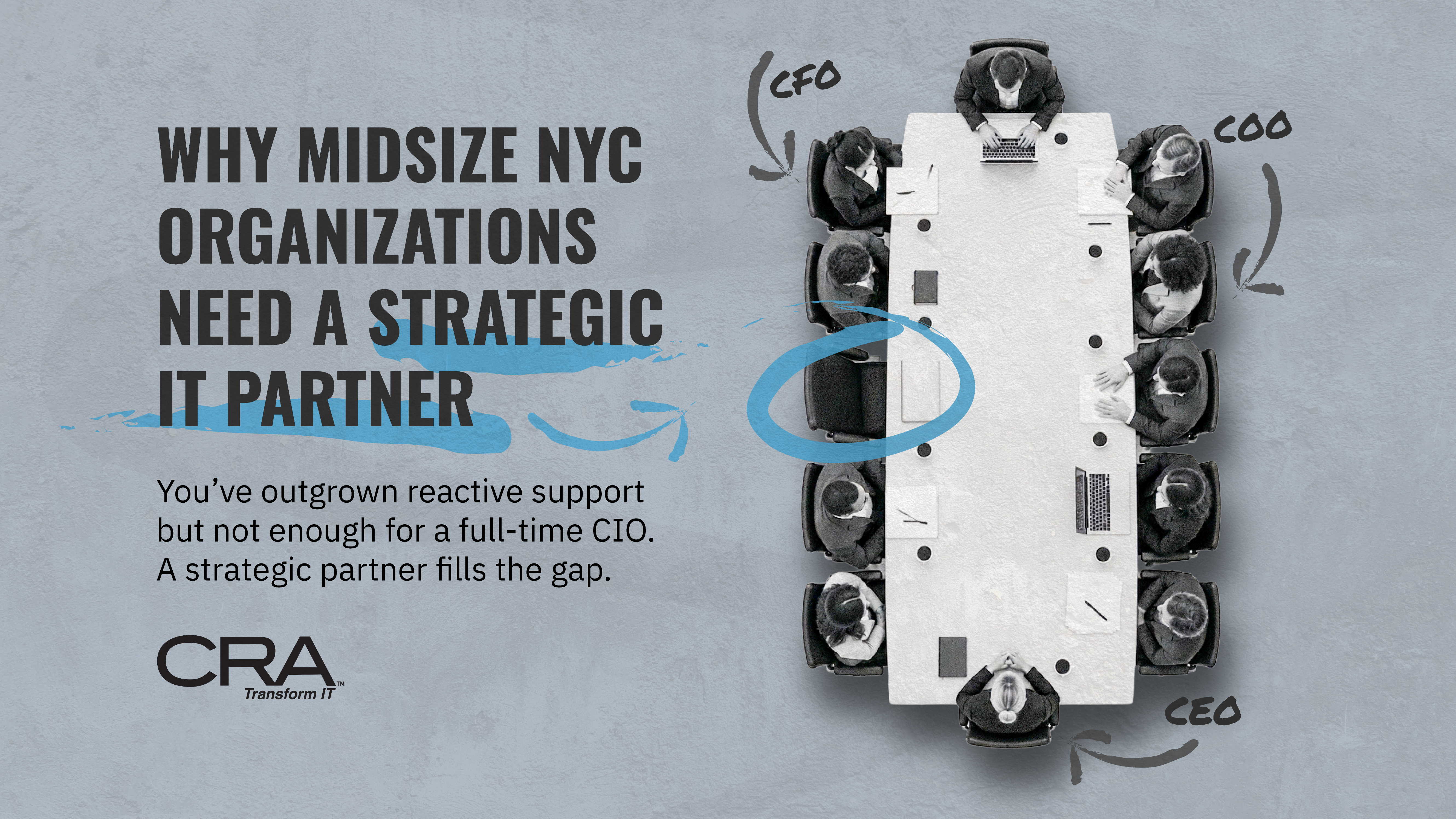
Why Midsize Organizations in NYC Need a Strategic IT Partner
Your help desk can close every ticket on time and you can still be making poor technology decisions. For a New York organization with 50 to 500 employees, that gap shows up in budget surprises, stalled projects, audit questions nobody can answer quickly, and a leadership team that approves IT spending without a clear view…
Your help desk can close every ticket on time and you can still be making poor technology decisions. For a New York organization with 50 to 500 employees, that gap shows up in budget surprises, stalled projects, audit questions nobody can answer quickly, and a leadership team that approves IT spending without a clear view…
Read full post on consultcra.com
Security Awareness and Employee Behavior: Building a Stronger First Line of Defense
When businesses think about cybersecurity, they often focus on firewalls, antivirus software, and other technical protections. While these tools are essential, they only cover part of the picture. The everyday decisions employees make can have just as much impact on a company's security. From clicking suspicious links to reusing passwords, small mistakes can create major security risks. Cybercriminals know this, which is why employees are often targeted through phishing emails, impersonation scams, and other tactics designed to take advantage of human behavior. The good news is that employee
When businesses think about cybersecurity, they often focus on firewalls, antivirus software, and other technical protections. While these tools are essential, they only cover part of the picture. The everyday decisions employees make can have just as much impact on a company's security. From clicking suspicious links to reusing passwords, small mistakes can create major security risks. Cybercriminals know this, which is why employees are often targeted through phishing emails, impersonation scams, and other tactics designed to take advantage of human behavior. The good news is that employees can also be one of a business's strongest lines of defense. With the right training, clear expectations, and consistent communication, businesses can build a security-conscious workplace that helps prevent threats before they become costly problems.
Read full post on blog.rcsprofessional.com

Microsoft 365 Guest Access Governance Guide for SMBs | Sourcepass
Microsoft 365 makes external collaboration straightforward, but access can become difficult to govern when contractors, vendors, customers, and partners accumulate permissions across Teams, SharePoint, OneDrive, applications, and Microsoft Entra ID. Effective Microsoft 365 guest access governance is not about eliminating external collaboration. It is about making that collaboration intentional, appropriately limited, and accountable. For SMBs, a useful guest access governance program establishes who can invite external users, what they can access, who owns the relationship, how long access s
Microsoft 365 makes external collaboration straightforward, but access can become difficult to govern when contractors, vendors, customers, and partners accumulate permissions across Teams, SharePoint, OneDrive, applications, and Microsoft Entra ID. Effective Microsoft 365 guest access governance is not about eliminating external collaboration. It is about making that collaboration intentional, appropriately limited, and accountable. For SMBs, a useful guest access governance program establishes who can invite external users, what they can access, who owns the relationship, how long access should remain active, and how the organization verifies that access is still needed. Microsoft Entra B2B collaboration allows organizations to share applications and services with external users while maintaining control over corporate data. External users can use their existing identities, and after accepting an invitation or completing sign-up, they are represented as user objects in the organization's directory. Microsoft explains the B2B collaboration model. The technology enables collaboration. Governance determines whether that access remains appropriate over time. Why Microsoft 365 Guest Access Requires Governance Guest access itself is not the problem. External users are often necessary for customer delivery, legal work, consulting, purchasing, managed services, and other routine business operations. The risk emerges when an external identity or permission no longer reflects a current business need. A contractor may finish a project but remain in a Microsoft 365 Group. A vendor could retain application access after a service relationship changes. A customer collaboration space may contain external users whose access has not been reconsidered as the project evolves. Microsoft identifies this broader access-management challenge in its guidance for Microsoft Entra access reviews. Microsoft notes that users can join groups, invite guests, connect to cloud applications, and work remotely, making continued access something organizations need to review deliberately. Microsoft Entra access reviews are designed to help organizations regularly verify continued access. For an SMB, the objective should be simple: every external identity should have a legitimate reason for access and an accountable relationship with the business. Start Guest Access Governance With Visibility Before changing Microsoft 365 external sharing policies, establish what external access already exists. Organizations should build an inventory that helps answer: Which guest accounts currently exist? What business relationship does each guest support? Which Microsoft 365 resources can external users access? Which internal owner is accountable for the relationship? Are any guests receiving broader access than their work requires? Which access relationships need to be reviewed? This is not simply an IT inventory. Guest access represents a business relationship expressed through technology. Give Every Guest Relationship an Owner IT can administer an identity, but IT may not know whether an outside attorney, consultant, vendor representative, or customer still needs access. That decision belongs with someone who understands the business relationship. Establish an owner for material external access. Depending on the situation, that may be a department leader, project owner, Microsoft 365 Group owner, or application owner. Microsoft specifically identifies guest access as a use case for access reviews. Its guidance notes that group owners can be asked to confirm whether guests still have a legitimate business need for access, particularly when groups provide access to business-sensitive content. [learn.microsoft.com] Governance becomes much more sustainable when business owners make business decisions and IT supplies the controls to enforce them. Design Microsoft 365 Guest Access Around the Business Need Before approving external access, determine what the person actually needs to accomplish. The answer should guide the scope of access. An outside user collaborating on a specific document may not need access to an entire workspace. A long-term service provider may need broader access than a contractor completing a short project. An external administrator requires different controls from a customer viewing shared information. Start with the business use case and work backward toward the technology. Define an External Access Standard A lightweight SMB governance standard can require several pieces of information before significant access is granted: External user's organization Business purpose Internal owner Resource requested Requested permission level Expected duration Sensitive information involved Approval, when required Conditions requiring future review This creates consistency without requiring a lengthy process for routine collaboration. The standard should also define who is permitted to invite guests. Microsoft Entra External ID provides external collaboration settings that can control who is permitted to send B2B guest invitations, including options for restricting invitations to particular roles. [learn.microsoft.com] The right setting depends on the organization's collaboration model. The governance question is whether invitation privileges match the organization's desired level of control. Apply Least Privilege to External Sharing Guest access should provide enough permission for the external user to perform the required work without granting unrelated access. That principle can be applied at several levels: Microsoft 365 Groups Teams workspaces SharePoint resources OneDrive content Enterprise applications Microsoft Entra roles Microsoft Entra B2B collaboration allows administrators to assign guest users to applications and groups. Microsoft also supports integration with SharePoint and OneDrive for sharing resources with external users while using Microsoft Entra B2B for authentication and management. [learn.microsoft.com] For SMBs, the question is not merely whether an external user can receive access. It is whether the scope matches the actual business requirement. Apply Stronger Controls to Sensitive Resources Not every Microsoft 365 workspace needs the same external sharing policy. A general project collaboration area presents a different risk from resources containing employee records, financial information, contracts, intellectual property, or sensitive customer data. Classifying collaboration scenarios by sensitivity can help organizations determine when they need: More restrictive external sharing Additional approval Tighter permissions Stronger authentication requirements More frequent access review Microsoft states that Conditional Access policies, including multifactor authentication requirements, can be applied at tenant, application, or specific guest-user levels to protect corporate applications and data. [learn.microsoft.com] The goal is to apply controls according to access risk rather than introducing identical friction into every external collaboration scenario. Govern Teams, SharePoint, OneDrive, and Entra ID Together Guest governance becomes difficult when individual Microsoft 365 workloads are treated independently. An external relationship can involve identity, group membership, applications, and shared content. Removing one permission does not by itself demonstrate that every other access path associated with the business relationship has been removed. Governance should therefore consider the relationship between: Microsoft Entra guest identities Microsoft 365 Groups Teams collaboration SharePoint sharing OneDrive sharing Enterprise applications Relevant administrative roles Microsoft Entra B2B supports integration with SharePoint and OneDrive, allowing organizations to use B2B authentication and management when sharing resources externally. [learn.microsoft.com] For IT leaders, that interconnected environment reinforces the need to govern external users through an identity lifecycle rather than treating each invitation as an isolated sharing event. Use Microsoft Entra Access Reviews to Revalidate Guest Access External access should not automatically continue because nobody asked for it to be removed. Microsoft Entra access reviews are designed to help organizations review group membership, enterprise application access, and role assignments so the appropriate people continue to have access. Microsoft supports recurring access reviews at weekly, monthly, quarterly, or annual frequencies. [learn.microsoft.com] For an SMB, the appropriate frequency should depend on risk and business need rather than an arbitrary schedule. Access to a sensitive application may justify more frequent review than participation in a lower-risk collaboration group. Ask the Business Owner a Direct Question An access review should produce a decision: Does this external user still have a legitimate business requirement for this access? If the answer is yes, retain the appropriate access. If the answer is no, remove it. If nobody can establish why access remains necessary, that should prompt further investigation rather than indefinite continuation. Microsoft specifically recommends proactively engaging resource owners to review who has access to their resources. [learn.microsoft.com] Consider Licensing When Planning Automated Reviews Licensing should be included in the implementation plan. Microsoft states that the access reviews capability requires Microsoft Entra ID Governance or Microsoft Entra Suite subscriptions for organizational users, while some capabilities may operate with Microsoft Entra ID P2. Specific access-review features can have additional licensing requirements. [learn.microsoft.com] SMBs should validate current licensing and feature requirements before designing a governance process that depends on automated access reviews. Where automation is unavailable or inappropriate, organizations can still establish an owned manual review process rather than allowing access to remain unchecked. Create a Guest Access Lifecycle Strong guest access governance covers the entire relationship, not only the initial invitation. A straightforward lifecycle consists of four stages. 1. Request Document who needs access, what they need, why they need it, and the internal business owner. 2. Approve and Provision Evaluate the requested access according to the sensitivity of the information and the external user's role. Provide only the permissions needed for the approved purpose. 3. Review Reassess whether the business relationship and access requirement are still valid. Higher-risk access should receive greater scrutiny. 4. Remove or Renew Remove access when the business purpose ends. If access must continue, document or certify the continued need according to the organization's governance process. This creates an important shift in employee behavior. Instead of treating external access as a permanent entitlement once approved, teams learn that collaboration has a lifecycle. Document and Review Guest Access Exceptions Some external relationships require long-term access. A managed service provider, attorney, accountant, auditor, strategic partner, or other external organization may have a legitimate ongoing role. Long-term should not mean unmanaged. An exception record should identify: Business purpose Internal owner Approved access Reason an exception is required Relevant safeguards Review date Conditions that require reevaluation Microsoft Entra access reviews can also support governance of policy exception lists. Microsoft identifies maintaining and periodically reviewing access-policy exceptions as a use case for the capability. [learn.microsoft.com] The objective is not to eliminate exceptions. It is to make sure leadership and IT can distinguish an approved exception from forgotten access. Measure Microsoft 365 Guest Access Governance An effective program needs metrics that show whether external collaboration is becoming more controlled. Rather than reporting only the total number of guest accounts, combine inventory measures with lifecycle and accountability measures. Useful KPIs can include: Active guest identities Guests without an identified business owner Pending or overdue access reviews External accounts with elevated access Exceptions awaiting review Temporary access retained beyond its approved period Percentage of required reviews completed Time required to remove access after a business relationship ends Organizations should select measures they can obtain reliably and use them consistently. The most important outcome is not necessarily fewer external users. A growing professional-services business may legitimately add more guests as customer collaboration expands. A better indicator is whether that growth remains governed. Make Secure External Collaboration Easier for Employees Guest access policies fail when employees cannot understand how they are supposed to work with outside parties. Give users an approved method for requesting and managing external collaboration. Explain what information IT or security needs and why it matters. Make the difference between routine collaboration and access to sensitive resources understandable. Employees should know: How to request external access Who approves sensitive access Which collaboration method to use Who owns the external relationship When access should be removed Where to report unusual activity or sharing The desired behavior is not to discourage collaboration. It is to make secure collaboration the easiest approved path. If legitimate work becomes unnecessarily difficult, employees may look for alternatives outside governed Microsoft 365 processes. Governance design should therefore consider usability alongside security. Integrate Guest Governance With Managed Microsoft Security For SMB IT teams, the difficulty is often not defining what good governance looks like. It is maintaining it as collaboration patterns, employees, external partners, and Microsoft 365 configurations change. Managed Microsoft security can support the operational side of guest governance through identity administration, access reviews, Microsoft 365 configuration management, exception tracking, monitoring, and reporting. The business should still own decisions about who needs access and why. The technical operating model should make those decisions visible and enforceable. That division of responsibility creates a sustainable model: Business owners validate the relationship. IT and security govern the access. The outcome is not a locked-down Microsoft 365 environment. It is an environment where the organization can explain who its external users are, what they can access, why they need that access, and how that access will eventually be reviewed or removed. FAQ What is Microsoft 365 guest access? Microsoft 365 guest access allows organizations to collaborate with people outside the organization. Through Microsoft Entra B2B collaboration, external users can use their existing identities to access approved company resources, and after invitation redemption or sign-up they are represented as user objects in the organization's directory. Microsoft explains how B2B guest collaboration works. What is guest access governance? Guest access governance is the process used to control the lifecycle of external access. It establishes who can request and approve access, what resources an external user can use, who owns the business relationship, how continued access is reviewed, and when permissions should be removed. What is Entra ID B2B? Microsoft Entra B2B collaboration is part of Microsoft Entra External ID. It allows organizations to share applications and services with external partners and guests while maintaining control over corporate data. External users can authenticate using their own identities and credentials. [learn.microsoft.com] How should SMBs manage Microsoft 365 guest access? SMBs should establish an external-access lifecycle covering requests, ownership, appropriate permissions, periodic review, exceptions, and removal. The process should be proportional to the sensitivity of the resource and the external user's business role rather than applying identical requirements to every collaboration scenario. What are Microsoft Entra access reviews? Microsoft Entra access reviews help organizations review group memberships, enterprise application access, and role assignments to verify that continued access remains appropriate. Reviews can also be configured to recur at defined frequencies. Microsoft explains access reviews and supported governance scenarios. Can Microsoft Entra require MFA for guest users? Microsoft states that Conditional Access policies, including multifactor authentication requirements, can be enforced at the tenant level, application level, or for specific guest users. The appropriate policy depends on the organization's collaboration and security requirements. [learn.microsoft.com] Can guest users access SharePoint and OneDrive? Yes. Microsoft Entra B2B can integrate with SharePoint and OneDrive for external sharing of resources such as files, folders, document libraries, list items, and sites while using B2B authentication and management. [learn.microsoft.com] How often should guest access be reviewed? The appropriate interval depends on the sensitivity of the resource and the nature of the external relationship. Microsoft Entra access reviews can support recurring reviews at weekly, monthly, quarterly, or annual frequencies. An SMB should use a review frequency that reflects the risk and business purpose of the access rather than treating every guest relationship identically. [learn.microsoft.com] Does Microsoft 365 guest access governance require additional licensing? Some governance capabilities do. Microsoft states that Microsoft Entra access reviews require Microsoft Entra ID Governance or Microsoft Entra Suite subscriptions for organizational users, while some capabilities may operate with Microsoft Entra ID P2. Specific features can have additional licensing requirements. Organizations should validate licensing before building automated access reviews into their governance process. [learn.microsoft.com] What should SMBs measure for external sharing governance? Useful measures include active guests, guests without assigned business owners, overdue access reviews, elevated external access, unresolved exceptions, and temporary access that remains after its approved period. The purpose of these measures is to determine whether external collaboration remains owned, reviewed, and appropriately limited rather than simply reducing the number of guests.
Read full post on blog.sourcepass.com
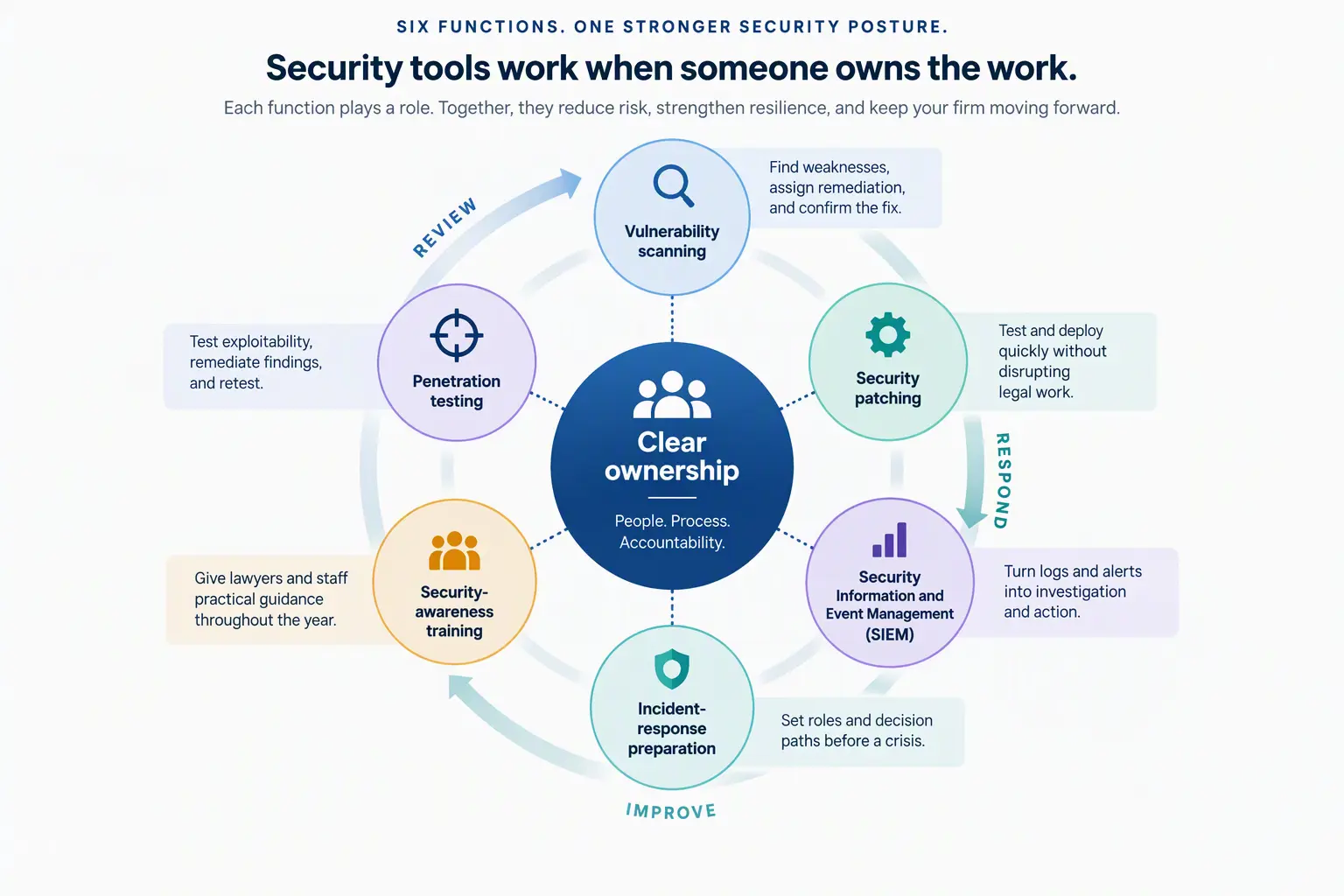
Six core components of a strong cybersecurity posture: Who will own the work?
A strong cybersecurity posture depends on more than tools. Law firms planning their 2027 IT budgets should assign clear ownership for vulnerability scanning, patching, SIEM, incident response, awareness training, and penetration testing.
A strong cybersecurity posture depends on more than tools. Law firms planning their 2027 IT budgets should assign clear ownership for vulnerability scanning, patching, SIEM, incident response, awareness training, and penetration testing.
Read full post on cornerstone.it