Leave IT to a MSP.
Discover leading Managed IT Service Providers across USA, Canada & the United Kingdom.
- 100s of leading MSPs
- Find a MSP near you
- Latest IT news for SMBs


What IT Documentation Should Every SMB Have?
Most small businesses know that they need IT infrastructure, but what they often forget is that you also need documentation. Documentation makes incident response, auditing, updates, configurations, and training much easier for everyone, including your IT support people. You might need to know where to start and what should be documented, so this guide will help you document your IT and get started with a review of your infrastructure. Audit of IT Assets Before you start, you should audit your environment. An IT audit helps with several future IT documentation and roadmaps, including risk asse
Most small businesses know that they need IT infrastructure, but what they often forget is that you also need documentation. Documentation makes incident response, auditing, updates, configurations, and training much easier for everyone, including your IT support people. You might need to know where to start and what should be documented, so this guide will help you document your IT and get started with a review of your infrastructure. Audit of IT Assets Before you start, you should audit your environment. An IT audit helps with several future IT documentation and roadmaps, including risk assessments, cybersecurity strategies, incident response documentation, disaster recovery plans, and scalability designs when you need more infrastructure to support additional workforce staff. Documentation is something many people put off until the last minute when it’s absolutely necessary, but being proactive will reduce your overhead when it needs to be done. Here are a few ways IT audit documentation can help: Cybersecurity and Network Management In any cybersecurity scenario, you will hear that the first step is documentation. Documentation helps IT professionals identify risks and track new devices on the network. Shadow IT is an issue where a user might add infrastructure to the environment and use it to steal data. If devices are documented, you can more quickly identify when a rogue device is present on the network and disable it. Another reason to document infrastructure is to track user personal devices. Most businesses allow users to access work resources using their own laptop or smartphone. This often leads to better productivity, but it opens your network to potential threats. Businesses can allow devices on the network and monitor them for threats while still being flexible with employee device choices to do their work. For network management, IT documentation should track user account policies. As the business grows, you might lose track of user accounts. Leaving user accounts active across the environment even after they leave the company is a huge security risk. Any account that isn’t tracked could be a security risk, but this risk is reduced when you document accounts. When employees leave the company, you can forward email to their supervisor and deactivate the account. The account deactivation should be across the entire environment, especially cloud applications where the user could potentially access these applications from a remote location. Account tracking is tedious, so IT support for network management is a benefit for small businesses that don’t have the resources to track this type of activity. Disaster Recovery Plans and Incident Response Every business should document their disaster recovery plan. A disaster recovery plan is a document that tells IT support and stakeholders what happens if an incident affects your environment. A disaster recovery plan could be put into action from a cyber-incident where a threat stole data from your network, a user fell for a phishing email, or a case of physical destruction from events like a flood or fire. It can also help with what to do after a physical break-in at your office location. You’ll see that many of the other IT documentation items fit into a disaster recovery plan. Here are a few items: Asset Configuration and Patch Management As your IT environment grows, you have more configurations to manage. You must also patch hardware and software with the latest security patches and updates to keep it secure from new threats. This step too can be tedious, especially for small businesses where they don’t have any dedicated staff to manage changing IT configurations. Monitoring configuration changes might seem unnecessary, but it will help when new staff is onboarded and must manage any issues as an IT support person. You can also have an easier time onboarding a managed service provider when the provider remotely monitors your network. Documenting network configuration changes also helps with disaster recovery. For example, a configuration change can cause an outage and must be rolled back to resume productivity as soon as possible. When a new security patch is available, it should be applied to avoid leaving vulnerabilities on the network. Having an audit and documentation of the environment configurations also helps with patching. Staff or a managed service provider can avoid common pitfalls when they have documentation of the configurations. For example, a configuration might be reset during a patch installation. The person in charge of IT infrastructure can then reconfigure the resource to ensure that service is not disrupted. Who Can Help with IT Documentation Most small businesses don’t have the time to document their environment. That’s where a managed service provider can help. Corporate Technologies can go through your network, document what’s needed, and then help with an IT roadmap to help your business scale. Contact us today to find out how we can help. FAQs
Read full post on gocorptech.com
MSPdb™ News


Don’t Let IT Problems Hide: What an “Egg Hunt” Can Teach You About Your Business Technology
In the spirit of a classic egg hunt, there’s a certain thrill in finding what’s hidden. But in the world of business technology, hidden...
In the spirit of a classic egg hunt, there’s a certain thrill in finding what’s hidden. But in the world of business technology, hidden...
Read full post on premworx.com

Legacy Software Vulnerabilities: The 2026 Risk Assessment Guide
Last Updated: April 3, 2026 Legacy Software Vulnerabilities: The 2026 Risk Assessment Guide If you’re running business-critical systems on software that hasn’t been meaningfully updated in five years—or longer—you’re not alone. We’ve been building and maintaining software in Nashville since 1992, and we’ve seen the same pattern play out dozens of times: businesses delay upgrades
Last Updated: April 3, 2026 Legacy Software Vulnerabilities: The 2026 Risk Assessment Guide If you’re running business-critical systems on software that hasn’t been meaningfully updated in five years—or longer—you’re not alone. We’ve been building and maintaining software in Nashville since 1992, and we’ve seen the same pattern play out dozens of times: businesses delay upgrades
Read full post on atiba.com
AI Chatbot Development: Building Intelligent Solutions for Nashville Businesses
Last Updated: April 3, 2026 AI Chatbot Development: Building Intelligent Conversational Systems That Actually Work After three decades building software in Nashville, we’ve watched businesses struggle with the same challenge: how do you serve customers 24/7 without burning out your team? The answer increasingly lies in AI chatbot development — but not the frustrating, robotic
Last Updated: April 3, 2026 AI Chatbot Development: Building Intelligent Conversational Systems That Actually Work After three decades building software in Nashville, we’ve watched businesses struggle with the same challenge: how do you serve customers 24/7 without burning out your team? The answer increasingly lies in AI chatbot development — but not the frustrating, robotic
Read full post on atiba.com
Improving Visibility Across Hybrid Networks
Understanding Hybrid Networks and the Need for Visibility Hybrid Network Visibility Platforms are essential in the current IT landscape, where hybrid networks represent an intricate web of on-premises and cloud-based infrastructures. A hybrid network may encompass various platforms, vendors, and services, adding a layer of complexity to the task of managing the network efficiently. As IT
Understanding Hybrid Networks and the Need for Visibility Hybrid Network Visibility Platforms are essential in the current IT landscape, where hybrid networks represent an intricate web of on-premises and cloud-based infrastructures. A hybrid network may encompass various platforms, vendors, and services, adding a layer of complexity to the task of managing the network efficiently. As IT
Read full post on alvaka.net

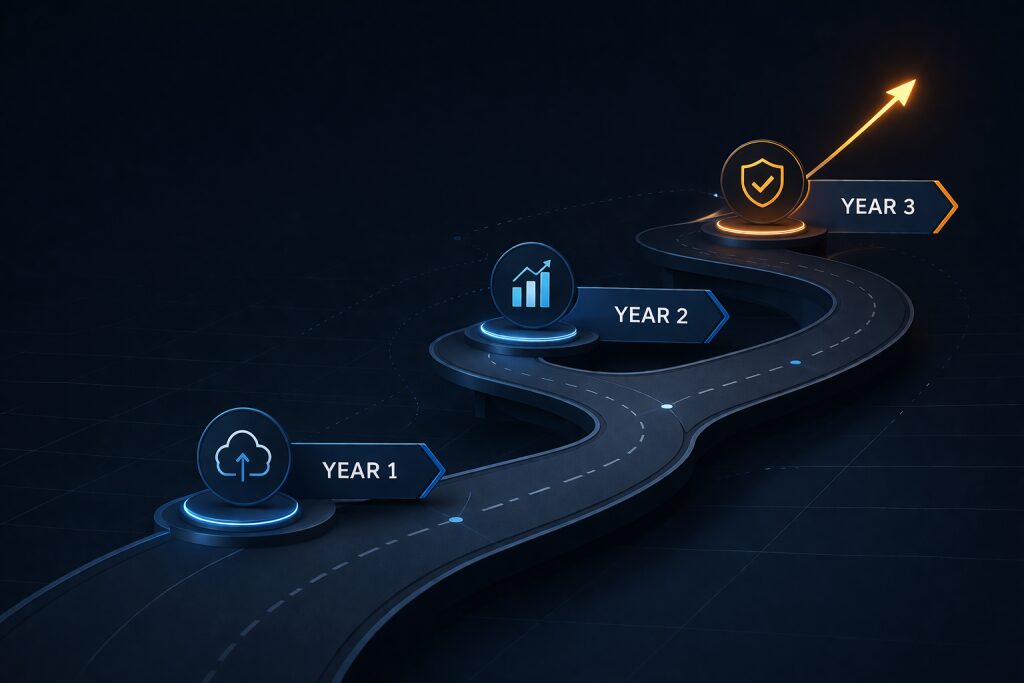
How to Build a 3-Year IT Roadmap (Without a Full-Time CIO)
IT roadmap planning is the process of building a multi-year technology strategy that aligns IT investments with business goals. A well-built IT roadmap covers infrastructure decisions, cybersecurity posture, software strategy, vendor management, and budget allocation—typically across a 3-year planning horizon. For mid-market companies without a dedicated CIO, a structured IT roadmap is the difference between ... Read more
IT roadmap planning is the process of building a multi-year technology strategy that aligns IT investments with business goals. A well-built IT roadmap covers infrastructure decisions, cybersecurity posture, software strategy, vendor management, and budget allocation—typically across a 3-year planning horizon. For mid-market companies without a dedicated CIO, a structured IT roadmap is the difference between ... Read more
Read full post on meriplex.com
Best IT Support Model for 10–80 Employee Companies
At some point in your company’s growth, you need someone to take care of your IT support. Users need help with technical issues, new hardware must be installed, and hackers are always targeting small businesses for their poor cybersecurity defenses. The best IT support model for 10-80 employees is partnering with a good managed service provider (MSP). Not only does partnering with an MSP take away most of the IT overhead, but you also know your infrastructure and cybersecurity are done right. Here are a few common MSP support models to help small businesses. Completely Outsourced MSP IT Suppor
At some point in your company’s growth, you need someone to take care of your IT support. Users need help with technical issues, new hardware must be installed, and hackers are always targeting small businesses for their poor cybersecurity defenses. The best IT support model for 10-80 employees is partnering with a good managed service provider (MSP). Not only does partnering with an MSP take away most of the IT overhead, but you also know your infrastructure and cybersecurity are done right. Here are a few common MSP support models to help small businesses. Completely Outsourced MSP IT Support Not every business has overnight staff, but it’s common for staff to work late nights or early mornings. If any of your staff travels, they might need support during off-peak hours. Most small business owners don’t stop work when they clock out. Small business owners are on-call days, nights and weekends. At some point, you need support for your IT infrastructure, and you might not find it if you don’t have dedicated support. Whether you need off-peak hours support or simple help with your infrastructure during working hours, an MSP is there to help. A good MSP has a 24/7 helpdesk to answer low-priority calls, but high-priority critical issues can be handled with onsite support. If you need new installations, an MSP’s onsite support will work with you to figure out the best solution, deploy it with minimal interference of business operations, and maintain it with upgrades and patches. Should your network suffer from an outage, an MSP will work with you to get it back up and running as soon as possible. Every MSP has a set service level agreement (SLA) that determines a timeframe for response and resolution. For example, you might be promised a 15-30 minute response for critical issues so that you have immediate support for a fast resolution. You also have the benefit of skilled professionals familiar with IT issues and how to fix them. Outsourcing your IT support to an MSP gives you help with anything software and hardware related. If you have no one with IT experience, this model might be the best choice. Pros: Cons: Co-Managed IT Support For businesses with at least 50 employees, you might prefer to have at least one onsite dedicated IT staff member. This staff member has a relationship with the people working in the office, and it’s easy for employees to quickly ask questions from the person sitting in a cubicle down the hall. A dedicated staff member seems like the more productive choice after your business has several dozen employees. A single staff member can’t handle every issue that presents itself, so you either hire more IT staff or use a co-managed IT support model. For most small businesses, engaging with an MSP is the answer. It’s more cost effective, and it provides help to a small IT department. IT support requires network monitoring, network maintenance, and constant updates to both staff workstations and networking equipment. The entire process of monitoring and managing a network becomes overwhelming for one or two IT people. Having a co-managed support model is a nice balance between onsite staff and expenses and relying on an MSP to remediate critical issues, monitor for any issues, and bring professional support that onsite staff might not have, like cybersecurity, cloud management and deployment, and disaster recovery. The MSP works directly with your onsite dedicated staff and acts as an extension of your IT support team. Pros: Cons: On-call for Intermittent Support Only For very small businesses with less than 10 employees, full-time MSP support might not be necessary. You might have very little IT infrastructure and don’t need support but once or twice a month. If you have little need for full-time support but still need help every once in a while, a more casual contract might be the best option. You still need a contract with an MSP, but you can pay as you go or pay only when you need support. This IT support model has several pitfalls, one of which is that it can get expensive if you need help with a critical issue that takes days to remediate. For example, suppose that you have a major data breach from ransomware. You need help with containing the threat, finding out what happened, and eradicating it from your network. Most businesses also need help with recovering data, if at all possible. Without disaster recovery plans in place, you could lose your data altogether, which is why professional help should be a proactive thought rather than reactive. A good MSP will work with your budget and decide which IT support model is best for your business. If you are thinking about this model, here are a few considerations. Pros: Cons: What MSP Model is Right for You? Every business has its own requirements, and these requirements are what you should focus on when you choose an IT support model. For businesses with a budget, you should carefully consider the right model, and look for an MSP that gives you a flat-rate monthly cost based on metrics like users. It might take you time to find the right provider, but Corporate Technologies can help you find the right IT support that suits your budget and your requirements. Contact us today to see what we can do to help support your IT infrastructure. FAQs
Read full post on gocorptech.com

The Mundane Apocalypse: Why the Biggest Threat to Your Business is Usually a Cup of Coffee
In the day-to-day reality of running a business in the Tri-Cities, downtime is rarely dramatic. It doesn't arrive with a siren; it arrives with a sigh. It’s the sound of a hard drive clicking, a screen going black, or the silence that follows a "Delete" key being pressed by mistake.
In the day-to-day reality of running a business in the Tri-Cities, downtime is rarely dramatic. It doesn't arrive with a siren; it arrives with a sigh. It’s the sound of a hard drive clicking, a screen going black, or the silence that follows a "Delete" key being pressed by mistake.
Read full post on burkitc.com
Audit‑Ready Without the Burn: SMB‑Friendly Checklists for IT and Data Governance
For small and midsize businesses (SMBs), audits often feel like a productivity tax. Whether it’s SOC 2, ISO 27001, HIPAA, or a customer‑driven review, the scramble is familiar: digging through inboxes for screenshots, asking IT for logs they no longer have, and realizing written policies don’t quite match how work actually gets done. The good news? Being audit‑ready doesn’t require enterprise tooling or
For small and midsize businesses (SMBs), audits often feel like a productivity tax. Whether it’s SOC 2, ISO 27001, HIPAA, or a customer‑driven review, the scramble is familiar: digging through inboxes for screenshots, asking IT for logs they no longer have, and realizing written policies don’t quite match how work actually gets done. The good news? Being audit‑ready doesn’t require enterprise tooling or
Read full post on netlogiccomputer.com
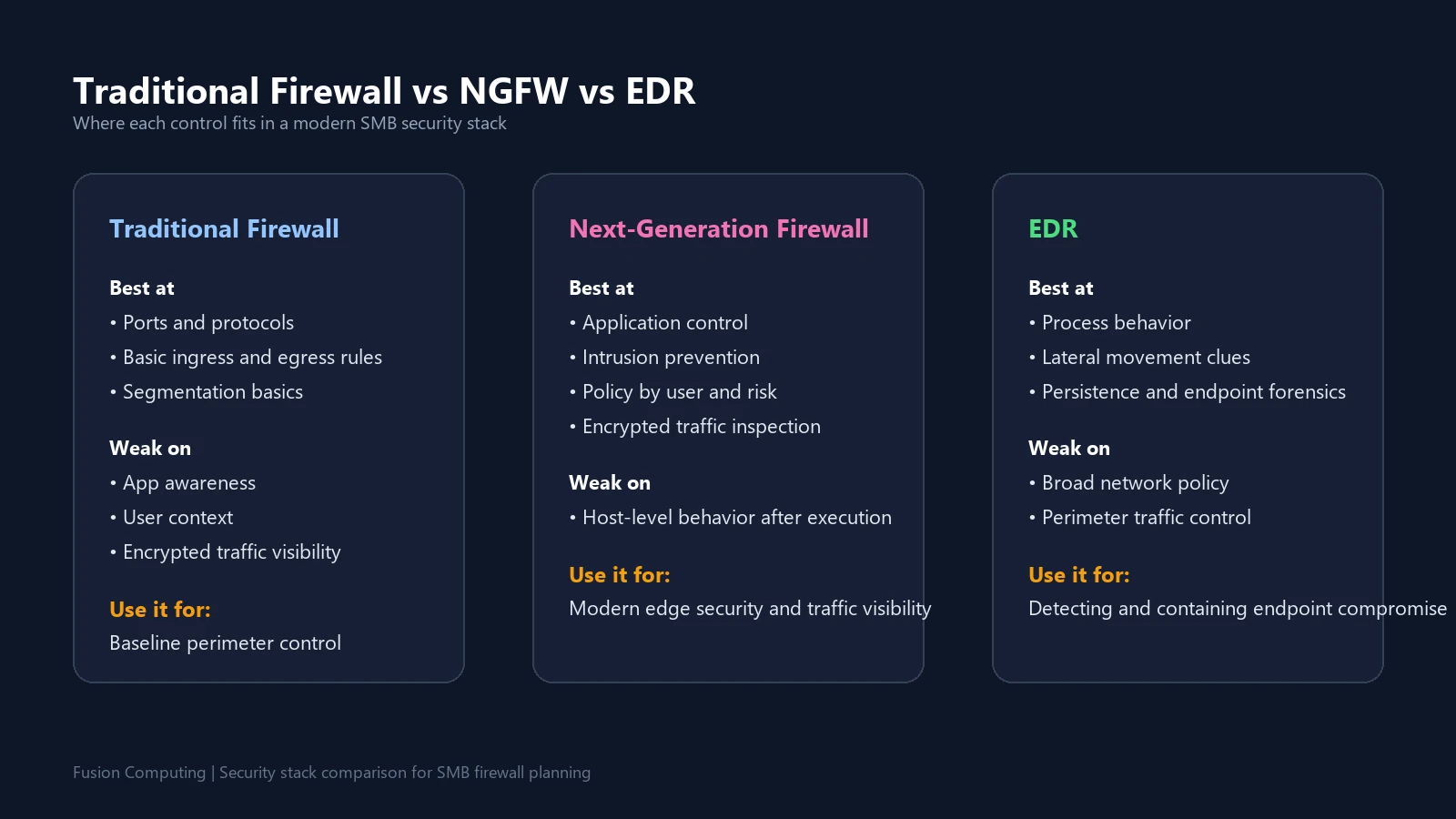
Next-Generation Firewall Explained: Features, Use Cases, Costs, and How to Choose One
By Mike Pearlstein, CISSP. I’ve been helping Canadian businesses secure and modernize their IT environments since 2012 across Toronto, Hamilton, and Metro Vancouver. This guide is for owners, operations leaders, and IT managers who need a practical explanation of what a next-generation firewall actually does and where it fits in a modern security stack. A
By Mike Pearlstein, CISSP. I’ve been helping Canadian businesses secure and modernize their IT environments since 2012 across Toronto, Hamilton, and Metro Vancouver. This guide is for owners, operations leaders, and IT managers who need a practical explanation of what a next-generation firewall actually does and where it fits in a modern security stack. A
Read full post on fusioncomputing.ca

7 Costly Business Technology Mistakes (And How to Avoid Them)

Just Added to MSPdb™

MSP Jobs
All Jobs
MSP Marketplace
View All


Popular MSPs
View All